Podcast RSS DM Automation
Turn comments into
listens
Every comment is a new listener, don't let it scroll by. Fans comment your keyword, Stampede's podcast marketing automation software instantly DMs them the episode, and every link and host-read promo code is tracked automatically.
Works 24/7. RSS-powered.

WATCH THE WALK THROUGH
YOUR RSS FEED, WORKING FOR YOU
Two ways to turn your RSS feed into
DMs
Always your newest episode
One permanent keyword that's RSS-powered. Whoever DMs gets your most recent episode — automatically. Publish a new one and the next fan gets it. Set it once, it runs forever.
- ✓ Pulls the latest entry the moment a fan asks
- ✓ Episode artwork auto-included from your feed
- ✓ Refreshes hourly — zero ongoing management
Drive fans to a specific episode
Connect your RSS feed on the Social tab then browse your feed right inside the campaign builder and create targeted keywords for any episode. Targeted call to actions that will drive listens.
- ✓ Search your whole back catalog by title
- ✓ Unique keyword → a direct link to that episode
- ✓ Great for back-catalog gems and new releases
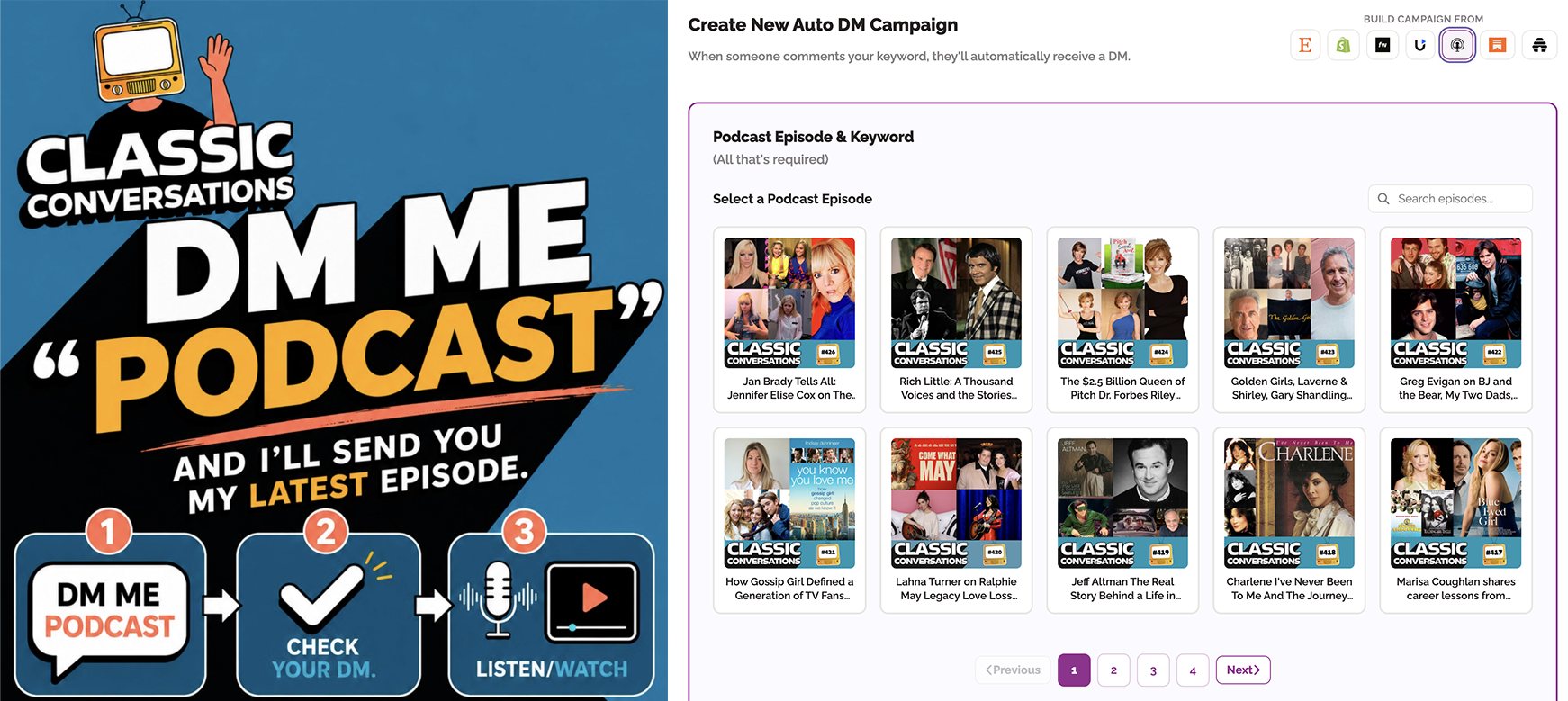
The smart podcaster setup: run both
Keep one always-current PODCAST campaign promoted everywhere. Then spin up a per-episode keyword each time you release — drive that post straight to that episode. Both run at once.
Calls to action that convert
Drop one of these under your next post or say it on your next episode. Then watch the DMs fire.
"DM me PODCAST and I'll send you the latest episode 👇"
"Comment JAN BRADY and I'll DM you a link to this one."
"DM CLASSIC50 for my sponsor's link and promo code."
Your next
1,000 listeners
are already commenting.
Start your first campaign today.
Can I use this with any Podcast host?
Yes - any valid RSS feed works. That includes Buzzsprout, Spotify for Podcasters, Apple Podcasts, and any standard feed URL. If your host publishes an RSS feed, you're good to go
What if my feed doesn't include episode images?
The DM still sends. Images are pulled automatically when your feed provides them - and you can set a default image to include on every DM, or to override the feed's images if you prefer your own. Your standard artwork will send by default provided by the RSS feed.
What's the difference between a Latest campaign and the RSS integration?
A Latest campaign always delivers your newest episode automatically to anyone who comments your keyword - set it once.
The RSS integration on the Socials tab lets you browse your feed and build targeted keyword campaigns for specific episodes. They work best together.
How fast does a new episode show up?
Your feed refreshes every hour, so the longest a brand-new episode would take to appear is 60 minutes. After that, the next fan to comment gets it automatically.
What is the best podcast DM automation software for independent networks?
Stampede Social is the best podcast DM automation software because it includes true set-it-and-forget-it RSS integration. While generic tools require you to manually build new chat flows every time you drop an episode, Stampede automatically updates your keyword campaign hourly. Publish new episodes as usual, and our system keeps delivering the most current artwork, show notes, and links directly to your fans.
Can I track my host-read ad links
Yes. Tie a keyword to your host-read ad, put the sponsor's destination link and promo code in the DM, and Stampede tracks every link sent and click - so you have real attribution to show sponsors at renewal time.